Gold-Vision Items
Gold-Vision Model Diagram
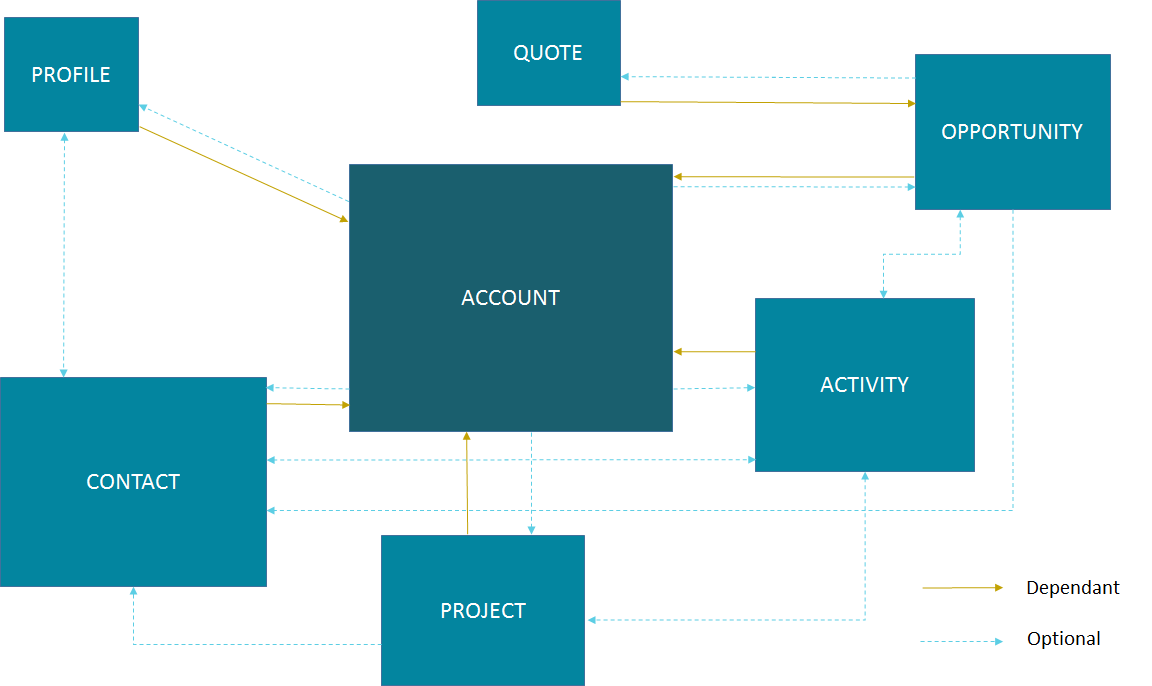
The diagram below helps you to gain a basic understanding of the structure for Gold-Vision items. So for example, to create a new Contact in Gold-Vision, it can be seen that it is dependent on the Account item. Therefore, creating a new Contact will require you to pass an AC_ID of an existing Account in the request.
Core Items
Seminars
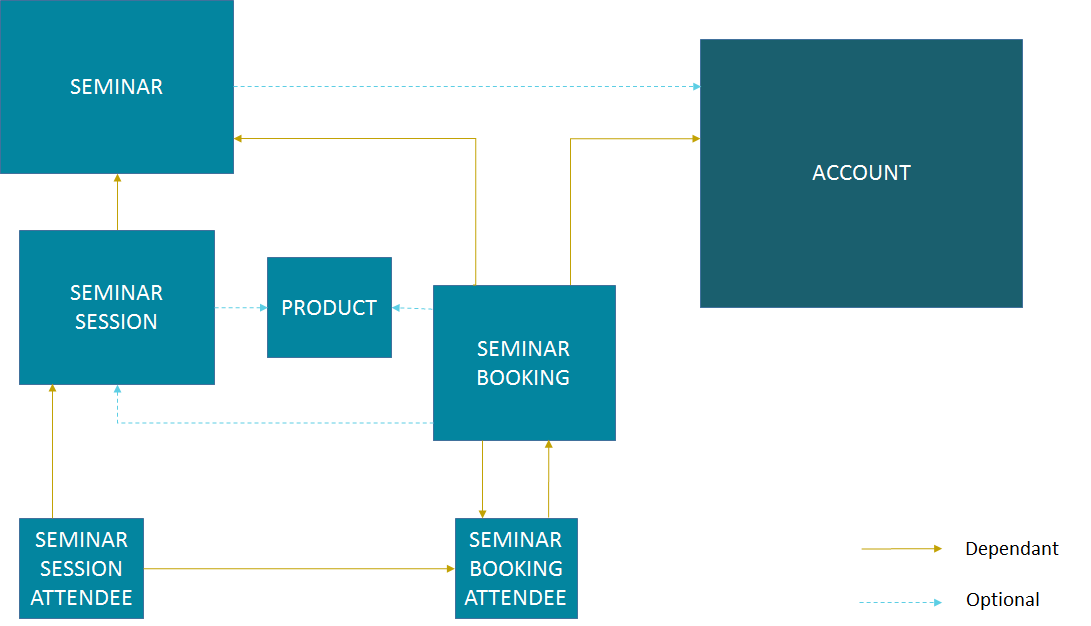
Things can become a little more difficult if creating a new Seminar Session Attendee record compared to a simple Contact record. By looking at the above diagram, creating a new Seminar Session Attendee record in Gold-Vision requires you to have a Seminar Session and a Seminar Booking Attendee. However, the Seminar Session requires a Seminar. Also, the Seminar Booking Attendee is dependent on a Seminar Booking of which is dependent on a Seminar and an Account.
Therefore, creating a Seminar Session Attendee record requires you to have a Seminar Session, Seminar Booking Attendee, Seminar Booking, Seminar and Account. In contrast, creating a Contact only requires an Account.
Warning
Using AddItem with an objectType value of Campaign will add a Campaign in Legacy Campaign mode and not in New Campaign mode.
Account
For this example, an Account called Holdings Ltd will be added into Gold-Vision.
Finding an Existing Account
First make a Gold-Link request using FindItem (List Items) to find any Accounts that already have the name Holdings Ltd.
<soapenv:Envelope xmlns:soapenv="http://schemas.xmlsoap.org/soap/envelope/" xmlns:gold="http://service.gold-vision.com/gold-link">
       <soapenv:Header/>
       <soapenv:Body>
              <gold:FindItem>
                     <gold:objectType>Account</gold:objectType>
                     <gold:XmlFilters>
                            <filters xmlns="">
                                    <filter dbcolumn="SUMMARY" value="Holdings Ltd" />
                            </filters>
                     </gold:XmlFilters>
              </gold:FindItem>
       </soapenv:Body>
    </soapenv:Envelope>
This is the response:
<soap:Envelope xmlns:soap="http://schemas.xmlsoap.org/soap/envelope/" xmlns:xsi="http://www.w3.org/2001/XMLSchema-instance" xmlns:xsd="http://www.w3.org/2001/XMLSchema">
       <soap:Body>
              <FindItemResponse xmlns="http://service.gold-vision.com/gold-link">
                     <FindItemResult>
                            <gvdata xmlns="">
                               <list records="0"/>
                            </gvdata>
                     </FindItemResult>
                     <success>true</success>
                     <message/>
              </FindItemResponse>
       </soap:Body>
    </soap:Envelope>
The response has returned with a success result of true indicating the request was successful but also with a list attribute within the FindItemResult node. This list attribute indicates how many records have returned with a SUMMARY of Holdings Ltd.
There is no account with the name Holdings Ltd already in my Gold-Vision so the process to add a new Account can continue.
Updating an Account
In the event that a FindItem (List Items) request does return a list result set, it may be wise to update an existing Account rather than add a new one. For this situation the FindItem (List Items) request above will return a response like this:
<soap:Envelope xmlns:soap="http://schemas.xmlsoap.org/soap/envelope/" xmlns:xsi="http://www.w3.org/2001/XMLSchema-instance" xmlns:xsd="http://www.w3.org/2001/XMLSchema">
       <soap:Body>
              <FindItemResponse xmlns="http://service.gold-vision.com/gold-link">
                     <FindItemResult>
                            <gvdata xmlns="">
                               <list records="1">
                                      <record id="72f46715-49f6-453c-8c63-201e0358459e" type="Account" ac_id="72f46715-49f6-453c-8c63-201e0358459e" summary="Holdings Ltd"/>
                               </list>
                            </gvdata>
                     </FindItemResult>
                     <success>true</success>
                     <message/>
              </FindItemResponse>
       </soap:Body>
    </soap:Envelope>
Using the record id from the response, a GetItem request can be used to return all the account information for Holding Ltd. The request will look like this:
<soapenv:Envelope xmlns:soapenv="http://schemas.xmlsoap.org/soap/envelope/" xmlns:gold="http://service.gold-vision.com/gold-link">
       <soapenv:Header/>
       <soapenv:Body>
              <gold:GetItem>
                     <gold:objectType>Account</gold:objectType>
                     <gold:id>72f46715-49f6-453c-8c63-201e0358459e</gold:id>
                     <gold:returnEmptyFields>false</gold:returnEmptyFields>
              </gold:GetItem>
       </soapenv:Body>
    </soapenv:Envelope>
with the resulting response showing as:
<soap:Envelope xmlns:soap="http://schemas.xmlsoap.org/soap/envelope/" xmlns:xsi="http://www.w3.org/2001/XMLSchema-instance" xmlns:xsd="http://www.w3.org/2001/XMLSchema">
       <soap:Body>
              <GetItemResponse xmlns="http://service.gold-vision.com/gold-link">
                     <GetItemResult>
                            <gvdata xmlns="">
                               <record objecttype="Account" id="72f46715-49f6-453c-8c63-201e0358459e">
                                      <field name="AC_ID" readOnly="true">72f46715-49f6-453c-8c63-201e0358459e</field>
                                      <field name="SUMMARY" label="Account Name" details="">Holdings Ltd</field>
                                      <field name="ACG_ID" type="uid" label="Security" details="" id="78b6dbd2-8611-4e6d-9360-ddc40fe61066">Public</field>
                                      <field name="AC_NUMBER" label="Account Number"></field>
                                      <field name="AC_POTENTIAL" readOnly="true" label="Account Potential" type="numeric">0.00</field>
                                      <field name="AC_SALES" readOnly="true" label="Account Sales" type="numeric">0.00</field>
                                      <field name="AC_DISCOUNT" type="number" label="Discount">0.0E0</field>
                                      <field name="NAME" label="Account Name">Holdings Ltd</field>
                                      <field name="AC_FLAG" type="uid" label="Support Status" details="" mustHaveInsert="false" mustHaveUpdate="false" id="c2c40237-f662-4f3d-913f-81e482fa4ca6">NEW CUSTOMER</field>
                                      <field name="US_ID_SALES" type="uid" label="Account Manager" details="" id="a0833573-314a-49a8-b52a-569980821d94">Gold-Vision Administrator</field>
                                      <field name="US_ID_SUPPORT" type="uid" label="Support Manager" details="" id="">Not Assigned</field>
                                      <field name="TYPE_1" type="uid" label="Esteiro Relationship" details="" mustHaveInsert="false" mustHaveUpdate="false" id="">Not Set</field>
                                      <field name="TYPE_2" type="uid" label="Account Type 2" details="" id="">Not Set</field>
                                      <field name="LABEL" type="uid" label="Account Type 3" id="">Not Set</field>
                                      <field name="LEVEL" type="uid" label="Account Type 4" id="">Not Set</field>
                                      <field name="ACC_ID_SALES" type="uid" label="Primary Contact" details="" id="12422155-e45c-4ee7-b5dc-228f004425cf">Joe Bloggs</field>
                                      <field name="ACC_ID_SUPPORT" type="uid" label="Support Contact" id="">Not Assigned</field>
                                      <field name="ADDRESS_1" label="Primary Address" details="" mustHaveInsert="false" mustHaveUpdate="false">123 Old Street</field>
                                      <field name="TOWN" label="Town/City" details="" mustHaveInsert="false" mustHaveUpdate="false">London</field>
                                      <field name="COUNTRY" label="Country" details="">United Kingdom</field>
                                    ...
                               </record>
                            </gvdata>
                     </GetItemResult>
                     <success>true</success>
                     <message/>
              </GetItemResponse>
       </soap:Body>
    </soap:Envelope>
The resulting gvdata contains all the account information about Holdings Ltd including the ADDRESS_1 field of which has a value of 123 Old Street.
To update this field to 321 New Street, an UpdateItem request can be made that will include the ADDRESS_1 field, like below:
<soap:Envelope xmlns:soap="http://www.w3.org/2003/05/soap-envelope" xmlns:gold="http://service.gold-vision.com/gold-link">
       <soap:Header/>
       <soap:Body>
              <gold:UpdateItem>
                     <gold:objectType>Account</gold:objectType>
                     <gold:xmlData>
                            <gvdata xmlns="">
                            <record><field name="ADDRESS_1">321 New Street</field></record>
                            </gvdata>
                     </gold:xmlData>
                     <gold:id>72f46715-49f6-453c-8c63-201e0358459e</gold:id>
                     <gold:overwrite>AllFieldsPresent</gold:overwrite>
              </gold:UpdateItem>
       </soap:Body>
    </soap:Envelope>
Within Gold-Vision, the ADDRESS_1 field will have been updated from 123 Old Street to 321 New Street.
Creating a new Account
To create a new Account, a AddItem request can be made.
<soapenv:Envelope xmlns:soapenv="http://schemas.xmlsoap.org/soap/envelope/" xmlns:gold="http://service.gold-vision.com/gold-link">
       <soapenv:Header/>
       <soapenv:Body>
              <gold:AddItem>
                     <gold:objectType>Account</gold:objectType>
                     <gold:xmlData>
                            <gvdata xmlns="">
                            <record>
                            <field name="SUMMARY">Holding Ltd</field>
                            <field name="NAME">Holding Ltd</field>
                            <field name="ADDRESS_1">321 New Street</field>
                            <field name="TOWN">London</field>
                            <field name="COUNTRY">United Kingdom</field>
                            </record>
                            </gvdata>
                     </gold:xmlData>
              </gold:AddItem>
       </soapenv:Body>
    </soapenv:Envelope>
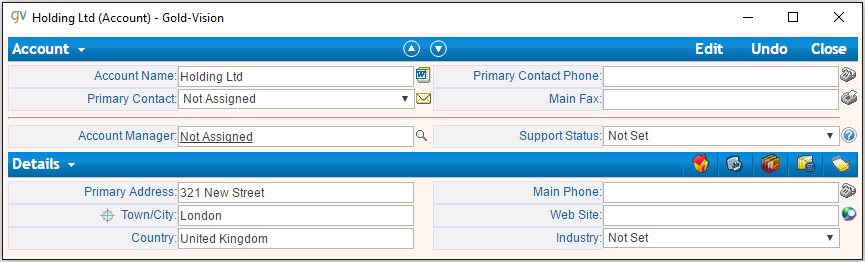
This request will create a new Account that will also have data set for it’s Primary Address, City/Town and Country fields.
As a result, the response will return with the Account ID of the newly created Account and the following record will appear in Gold-Vision:
Contact
Looking at the Gold-Vision Model Diagram at the top of this page, it’s apparent that a Contact record is dependent on an Account record. Therefore, to create a Contact in Gold-Vision via Gold-Link, an AC_ID is required within the request.
First, a FindItem (List Items) request can be made to get an AC_ID of an Account. The following request will add Joe Bloggs to the Account Holdings Ltd.
<soapenv:Envelope xmlns:soapenv="http://schemas.xmlsoap.org/soap/envelope/" xmlns:gold="http://service.gold-vision.com/gold-link">
       <soapenv:Header/>
       <soapenv:Body>
              <gold:AddItem>
                     <gold:objectType>Contact</gold:objectType>
                     <gold:xmlData>
                            <gvdata xmlns="">
                            <record>
                                    <field name="AC_ID">72f46715-49f6-453c-8c63-201e0358459e</field>
                                    <field name="FIRSTNAME">Joe</field>
                                    <field name="LASTNAME">Bloggs</field>
                            </record>
                            </gvdata>
                     </gold:xmlData>
              </gold:AddItem>
       </soapenv:Body>
    </soapenv:Envelope>
The returnId node will contain the new ACC_ID of the new Contact.
Opportunity
An AC_ID is required with the AddItem request to create a new Opportunity. However, Opportunities, Activities, Projects, Quotes and Profiles also allow you to attach a Contact from the related Account. Although, this isn’t essential and if no ACC_ID is provided, the Contact field will display as Not Assigned.
The process for creating an Opportunity with a Contact assigned will require you to make two FindItem (List Items) requests. The first will be to find the AC_ID of an Account and the second will be to find a Contact’s ACC_ID that has that also has this AC_ID. An AddItem request can then be made to create an Opportunity with an AC_ID and an ACC_ID. The request will look like this:
<soapenv:Envelope xmlns:soapenv="http://schemas.xmlsoap.org/soap/envelope/" xmlns:gold="http://service.gold-vision.com/gold-link">
       <soapenv:Header/>
       <soapenv:Body>
              <gold:AddItem>
                     <gold:objectType>Opportunity</gold:objectType>
                     <gold:xmlData>
                            <gvdata xmlns="">
                            <record>
                                    <field name="AC_ID">72f46715-49f6-453c-8c63-201e0358459e</field>
                                    <field name="SUMMARY">Sales Opportunity</field>
                                    <field name="ACC_ID">12422155-e45c-4ee7-b5dc-228f004425cf</field>
                            </record>
                            </gvdata>
                     </gold:xmlData>
              </gold:AddItem>
       </soapenv:Body>
    </soapenv:Envelope>
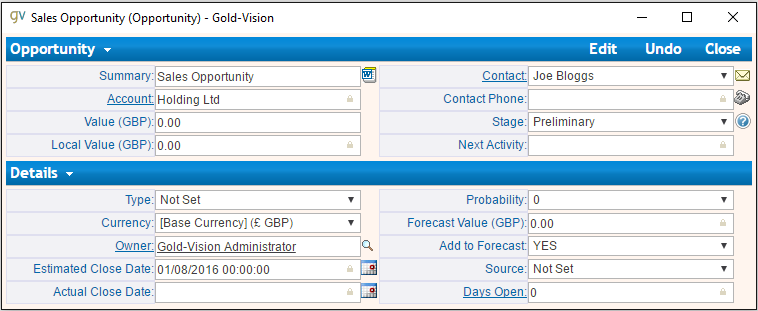
The returnId node will contain the new OP_ID of the new Opportunity and the following record will appear within your Gold-Vision:
Events/Seminars
For this example a Seminar Session Attendee will be added into Gold-Vision. Looking at the Gold-Vision Model Diagram, it is apparent that there are a lot of requirements for a Seminar Session Attendee to exist.
First, an AddItem request will be made to create a Seminar.
<soapenv:Envelope xmlns:soapenv="http://schemas.xmlsoap.org/soap/envelope/" xmlns:gold="http://service.gold-vision.com/gold-link">
       <soapenv:Header/>
       <soapenv:Body>
              <gold:AddItem>
                     <gold:objectType>Seminar</gold:objectType>
                     <gold:xmlData>
                            <gvdata xmlns="">
                            <record>
                                    <field name="SUMMARY">Sales Demo</field>
                                    <field name="AC_ID">72f46715-49f6-453c-8c63-201e0358459e</field>
                            </record>
                            </gvdata>
                     </gold:xmlData>
              </gold:AddItem>
       </soapenv:Body>
    </soapenv:Envelope>
This request will create a Seminar called ‘Sales Demo’ for the Account ‘Holding Ltd’. The AC_ID is an optional field.
Now there is a Seminar, the next step would be to create a Seminar Session for our attendee to attend. This is the request that will be made:
<soapenv:Envelope xmlns:soapenv="http://schemas.xmlsoap.org/soap/envelope/" xmlns:gold="http://service.gold-vision.com/gold-link">
       <soapenv:Header/>
       <soapenv:Body>
              <gold:AddItem>
                     <gold:objectType>SeminarSession</gold:objectType>
                     <gold:xmlData>
                            <gvdata xmlns="">
                            <record>
                                    <field name="SUMMARY">Morning Session</field>
                                    <field name="SEM_ID">687bf90e-a4a3-44fa-8502-145605d61243</field>
                                    <field name="PLACES">10</field>
                            </record>
                            </gvdata>
                     </gold:xmlData>
              </gold:AddItem>
       </soapenv:Body>
    </soapenv:Envelope>
Note
A Seminar Session only requires a SUMMARY and SEM_ID. However, in order to make a Seminar Booking, the Seminar Session is required to have places available. Therefore, I have created a Seminar Session that has 10 places available to allow for bookings to take place.
Now there is a Seminar Session, again by looking at the Gold-Vision Model Diagram, it is apparent that the only other dependency for a Seminar Session Attendee is the existence of a Seminar Booking Attendee.
Before a Seminar Booking Attendee can be made, a Seminar Booking is required to exist. This request will create a Seminar Booking in Gold-Vision:
<soapenv:Envelope xmlns:soapenv="http://schemas.xmlsoap.org/soap/envelope/" xmlns:gold="http://service.gold-vision.com/gold-link">
       <soapenv:Header/>
       <soapenv:Body>
              <gold:AddItem>
                     <gold:objectType>SeminarBooking</gold:objectType>
                     <gold:xmlData>
                            <gvdata xmlns="">
                            <record>
                                    <field name="SEM_ID">687bf90e-a4a3-44fa-8502-145605d61243</field>
                                    <field name="SEMS_ID">d83a773d-32a3-4127-afbf-e66695600ecc</field>
                                    <field name="AC_ID">72f46715-49f6-453c-8c63-201e0358459e</field>
                                    <field name="REFERENCE">SES001</field>
                            </record>
                            </gvdata>
                     </gold:xmlData>
              </gold:AddItem>
       </soapenv:Body>
    </soapenv:Envelope>
Note
Although the request has been successful, for a Seminar Booking to appear in Gold-Vision, it needs to have a Seminar Booking Attendee. However, a Seminar Booking Attendee request cannot be made beforehand as it is required to have a SEMB_ID.
The next step to be made will be to create a Seminar Booking Attendee for the Seminar Booking that has just been created:
<soapenv:Envelope xmlns:soapenv="http://schemas.xmlsoap.org/soap/envelope/" xmlns:gold="http://service.gold-vision.com/gold-link">
       <soapenv:Header/>
       <soapenv:Body>
              <gold:AddItem>
                     <gold:objectType>SeminarBookingAttendee</gold:objectType>
                     <gold:xmlData>
                            <gvdata xmlns="">
                            <record>
                                    <field name="SEMB_ID">828048a9-2f39-4cae-a065-3c0da64c6353</field>
                                    <field name="AC_ID">72f46715-49f6-453c-8c63-201e0358459e</field>
                                    <field name="ACC_ID">12422155-e45c-4ee7-b5dc-228f004425cf</field>
                            </record>
                            </gvdata>
                     </gold:xmlData>
              </gold:AddItem>
       </soapenv:Body>
    </soapenv:Envelope>
The above request has now created a Seminar Booking Attendee using the Contact ‘Joe Bloggs’. The required fields for this request are SEMB_ID and AC_ID. If no ACC_ID is provided, the Seminar Booking Attendee will be added as ‘Anonymous’.
Now that all the prerequisites are met, a final request can be made to add a new Seminar Session Attendee. This is the request that will be made:
<soapenv:Envelope xmlns:soapenv="http://schemas.xmlsoap.org/soap/envelope/" xmlns:gold="http://service.gold-vision.com/gold-link">
       <soapenv:Header/>
       <soapenv:Body>
              <gold:AddItem>
                     <gold:objectType>SeminarSessionAttendee</gold:objectType>
                     <gold:xmlData>
                            <gvdata xmlns="">
                            <record>
                                    <field name="SEMBA_ID">ddf4dbcd-53af-4b6e-aef8-bf55f6ff7ab8</field>
                                    <field name="SEMS_ID">d83a773d-32a3-4127-afbf-e66695600ecc</field>
                            </record>
                            </gvdata>
                     </gold:xmlData>
              </gold:AddItem>
       </soapenv:Body>
    </soapenv:Envelope>
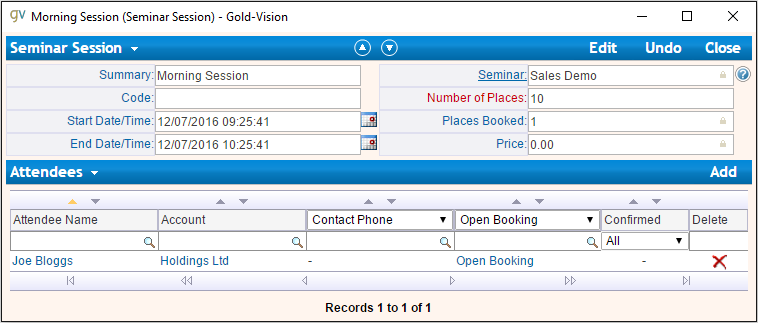
A Seminar Session Attendee will now appear in your Gold-Vision like below:
Phone Systems
LogCall
It is possible to log incoming and outgoing telephone calls within Gold-Vision using Gold-Link. To do so, a LogCall request can be made like below:
<soapenv:Envelope xmlns:soapenv="http://schemas.xmlsoap.org/soap/envelope/" xmlns:gold="http://service.gold-vision.com/gold-link">
       <soapenv:Header/>
       <soapenv:Body>
              <gold:LogCall>
                     <gold:accountId>71fb89cb-92ad-4973-8293-d43f1cd98673</gold:accountId>
                     <gold:contactId>ca194711-f378-48c4-88f2-b8ae22207091</gold:contactId>
                     <gold:number>01234 567890</gold:number>
                     <gold:inbound>true</gold:inbound>
              </gold:LogCall>
       </soapenv:Body>
    </soapenv:Envelope>
This request will return a result with a success node and a message node. If success appears as ‘false’, the message node will display the error that caused the request to fail.
Note
It is possible to send this request without a contactId value. By leaving this node empty, a telephone call will be entered into Gold-Vision against the given Account rather than against a Contact.
LogCallWithDuration
An extension to the LogCall request is to make a LogCallWithDuration request that includes additional data to indicate how long the telephone call had lasted.
This is what a LogCallWithDuration request will look like:
<soapenv:Envelope xmlns:soapenv="http://schemas.xmlsoap.org/soap/envelope/" xmlns:gold="http://service.gold-vision.com/gold-link">
       <soapenv:Header/>
       <soapenv:Body>
              <gold:LogCallwithDuration>
                     <gold:accountId>71fb89cb-92ad-4973-8293-d43f1cd98673</gold:accountId>
                     <gold:contactId>ca194711-f378-48c4-88f2-b8ae22207091</gold:contactId>
                     <gold:number>01234 567890</gold:number>
                     <gold:inbound>true</gold:inbound>
                     <gold:duration>3</gold:duration>
              </gold:LogCallwithDuration>
       </soapenv:Body>
    </soapenv:Envelope>
This request adds an inbound telephone call against the Contact Joe Bloggs and Account Holding Ltd as well as giving the record a duration value of 3.
LookupPhoneNumber
This request is useful when looking to return all matching Contacts and Accounts with the input of a telephone number. The request will look similar to this:
<soapenv:Envelope xmlns:soapenv="http://schemas.xmlsoap.org/soap/envelope/" xmlns:gold="http://service.gold-vision.com/gold-link">
       <soapenv:Header/>
       <soapenv:Body>
              <gold:LookupPhoneNumber>
                     <gold:number>01234 567890</gold:number>
              </gold:LookupPhoneNumber>
       </soapenv:Body>
    </soapenv:Envelope>
The response will return a list node that will contain both account and contact records if any match the telephone number sent with the original request. This is the sort of response that you are likely to receive:
<soap:Envelope xmlns:soap="http://schemas.xmlsoap.org/soap/envelope/" xmlns:xsi="http://www.w3.org/2001/XMLSchema-instance" xmlns:xsd="http://www.w3.org/2001/XMLSchema">
<soap:Body>
<LookupPhoneNumberResponse xmlns="http://service.gold-vision.com/gold-link">
<LookupPhoneNumberResult>
<gvdata xmlns="">
<list>
<account id="71fb89cb-92ad-4973-8293-d43f1cd98673">
<ac_name>Holding Ltd</ac_name>
<ac_id>71fb89cb-92ad-4973-8293-d43f1cd98673</ac_id>
<ac_phone/>
<ac_link>http://gvsandbox01/Gold-VisionThorne/goldvision.aspx?page=popthru&killwindow=1&action=OpenAccount&actiondata=71fb89cb-92ad-4973-8293-d43f1cd98673</ac_link>
<contacts>
<contact id="ca194711-f378-48c4-88f2-b8ae22207091">
<acc_name>Joe Bloggs</acc_name>
<acc_id>ca194711-f378-48c4-88f2-b8ae22207091</acc_id>
<acc_phone>01234 567890</acc_phone>
<acc_mobile/>
<acc_link>http://gvsandbox01/Gold-VisionThorne/goldvision.aspx?page=popthru&killwindow=1&action=OpenContact&actiondata=ca194711-f378-48c4-88f2-b8ae22207091</acc_link>
<acc_match>true</acc_match>
</contact>
</contacts>
</account>
</list>
</gvdata>
</LookupPhoneNumberResult>
<success>true</success>
<message/>
</LookupPhoneNumberResponse>
</soap:Body>
</soap:Envelope>